One set of numbers: scaling a VC firm's data platform on Snowflake
VC data lives in a CRM, portfolio reports, fund admin and many spreadsheets. Here is how I turn it into one set of numbers on Snowflake, and what I watch along the way.

Picture the week before quarterly reporting. A partner asks a simple question: how much have we deployed in this fund so far?
In many firms, three people would give three answers. All of them pulled the number honestly. They just pulled it from different places.
That is the problem I work on. Since September 2024 I help a VC firm I work with scale its data infrastructure, and I manage its Snowflake. This is a field note on the approach and what I pay attention to.
Why VC data gets messy

A VC firm is small, but its data is not simple. Deals and relationships live in the CRM. Portfolio companies send their own reports, each in their own format.
Then there is market data from outside providers, fund numbers from the fund administrator, and a long tail of spreadsheets that someone built for one question and kept using.
Each source is fine alone. The trouble starts when a report needs all of them.
And reporting comes in waves. Quarter end and LP reporting (reports for the investors in the fund) create a peak where everyone needs the same data at the same time.
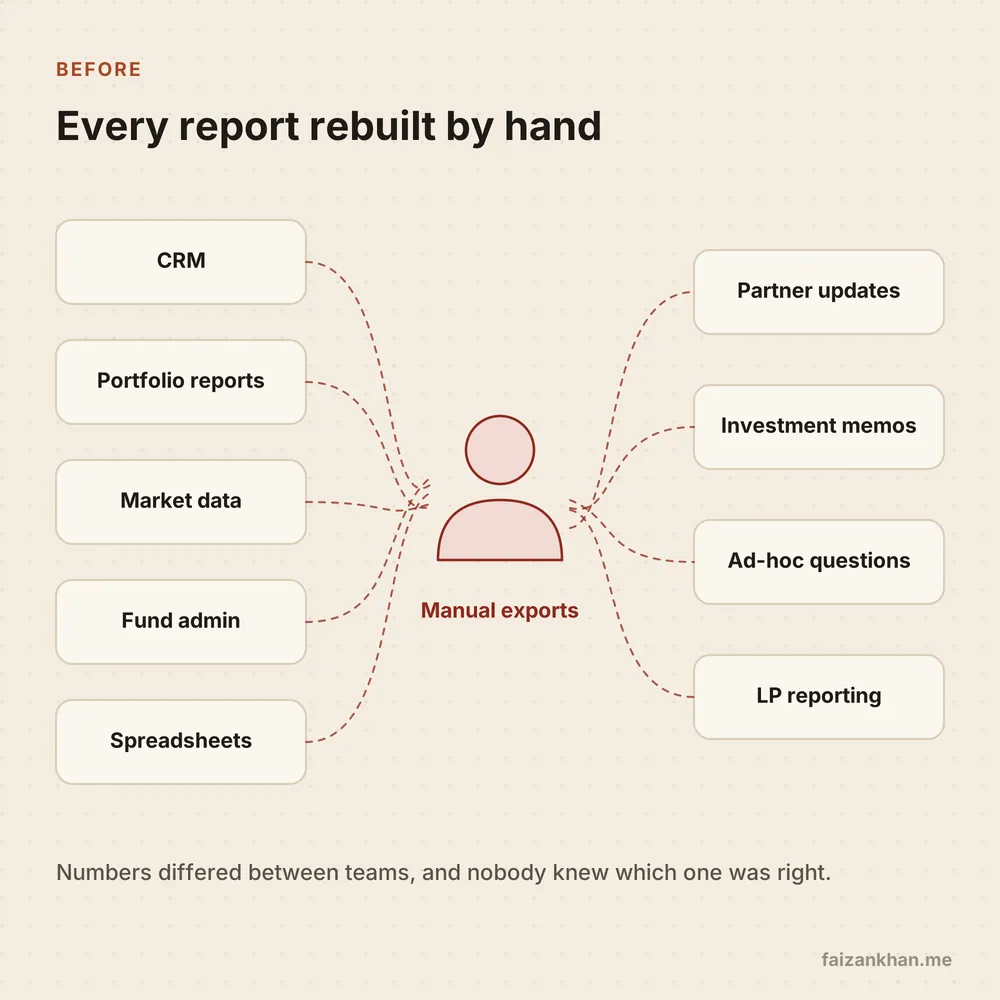
Without a platform, a person becomes the integration layer. They export, clean and paste, again for every report. It works until that person is on holiday, or until two people do it slightly differently.
The goal: one set of numbers

The goal is not a fancy stack. The goal is that a number means the same thing in every dashboard, memo and partner update.
When someone asks a question, they should get the same answer no matter who runs the query. If the answer changes, it should be because the data changed, not because the method did.
Everything else in this post serves that goal: the pipelines, the tests, the access rules and even the cost work.
A platform is finished when people stop arguing about the number and start arguing about what it means.
The shape of the platform
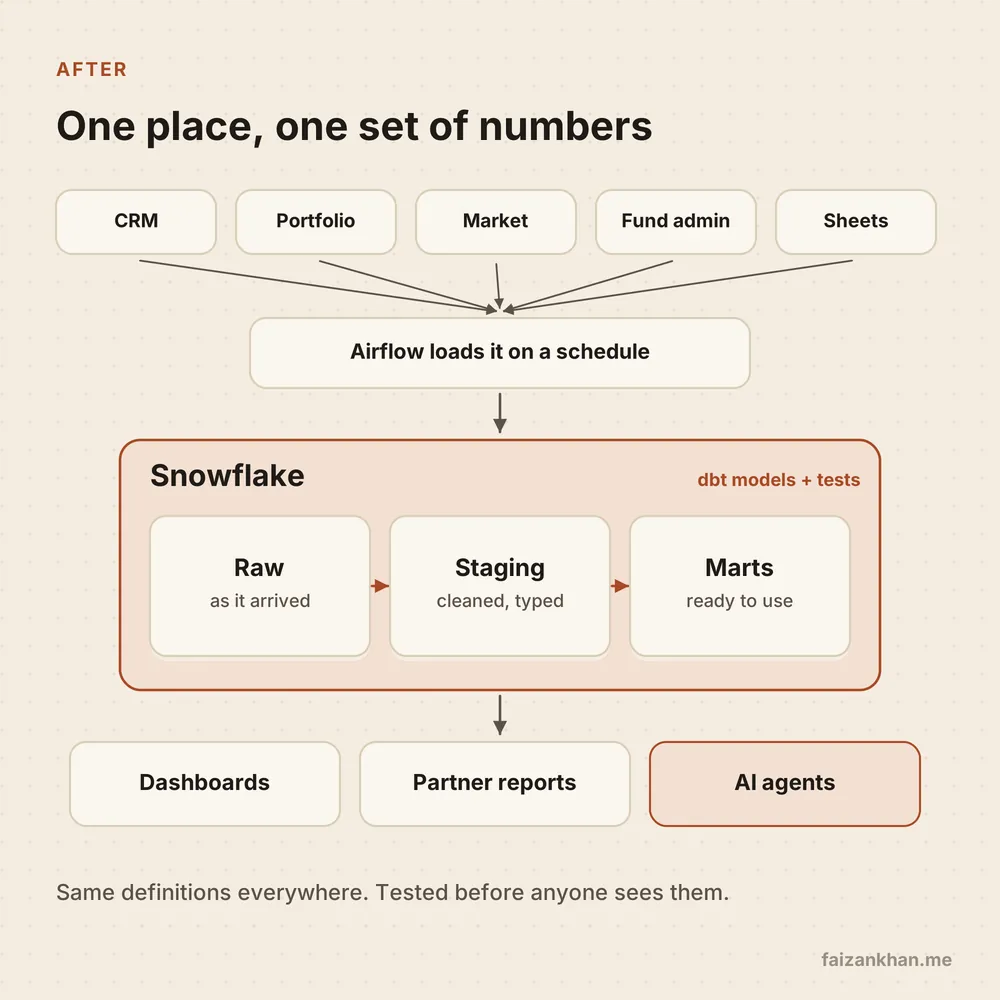
The shape is close to what I built earlier at BIT Capital, a fintech, with Airflow, Snowflake, S3 and PostgreSQL. The main thing I add now is dbt.
Airflow runs the loads on a schedule, with retries and alerts. Every load is idempotent: running it twice gives the same result, so a retry never creates duplicate rows.
Snowflake holds the data in three layers:
- Raw: data exactly as it arrived. Never edited. If a bug shows up later, you rebuild from here.
- Staging: cleaned and typed.
- Marts: ready-to-use tables for a purpose, like fund performance or the deal pipeline.
dbt builds the staging and mart tables as SQL models kept in Git. Each model has tests, for example "this ID is unique" or "this amount is never null", and documentation that explains each column. If a test fails, the bad data stops before anyone sees it.
Alongside this, I also moved older pipelines to a lakehouse and set up MLOps with CI/CD there. This post stays on the Snowflake side.
Definitions and owners
Tools do not agree on definitions. People do. "Invested capital" or "active portfolio company" can be counted in more than one reasonable way.
So each important metric gets two things. A written definition that lives in the dbt model and its docs. And a named owner, a real person who decides when the definition changes.
The owner is usually not the data engineer. It is the person in finance or on the investment team who answers for that number. My job is to make their definition run the same way every time.
Who sees what
VC data has layers of sensitivity. Deal flow is shared widely inside the firm. Fund data and LP details are not.
Snowflake handles this with role-based access control, or RBAC: you grant rights to roles, and give roles to people. I keep sensitive fund data in its own database or schema, readable only by a role for the people who need it.
Dashboards and tools get their own roles too, with read access to marts only. Nobody reads raw tables for reporting. Least privilege, meaning every user and tool gets only the access it needs, is much easier to set up on day one than to add later.
Keeping Snowflake costs boring
Snowflake bills compute in credits, used while a virtual warehouse (a compute cluster) is running. Most cost surprises come from a few habits, so these are the ones I check:
- Right-size warehouses. Each size step doubles the credits per hour. Start small and size up only when a query really needs it.
- Auto-suspend and auto-resume. A warehouse should stop after a short idle time and start again when a query arrives. An idle warehouse that never suspends is pure waste.
- Separate warehouses per workload. One for loading, one for dbt transformations, one for BI. Then you can see who spends what, and a heavy load never slows down a partner's dashboard.
- Resource monitors and budgets. Set credit limits that notify you, and suspend a warehouse if needed, before the invoice does.
- Find expensive queries. The query profile shows where time goes. If a query scans most partitions of a large table, a clustering key or a better filter often helps.
- Avoid
SELECT *. Snowflake stores data by column, so reading only the columns you need means less data scanned.
For quarter end, I treat extra compute as a temporary resize, not a new default. Size for the normal week.
Ready for AI agents
More firms now want AI agents and RAG (retrieval augmented generation, where a model answers from your own data) on top of their data. The good news: the work above is most of the preparation.
An agent should query clean marts, not raw tables. It needs the same semantic definitions people use, so "invested capital" means one thing to both. And it should run with a read-only role, on its own small warehouse with a resource monitor and a statement timeout.
That way an agent can answer questions, but it cannot change data, see fund data it should not see, or run up a large bill with one bad query.
The mistake to avoid
The most common mistake I see is building dashboards before the definitions are agreed. It feels productive, because people see charts fast.
But each dashboard then bakes in its own version of the logic. When the definitions are finally settled, you rebuild them all, and trust takes a hit in between.
The honest trade-off: agreeing on definitions first is slower and less visible. A few weeks of meetings and docs show nothing on screen. I still think it is the right order.
Agree on the meaning first. Charts are cheap after that.
What I would tell you
- Start with one question that matters. Pick a number partners ask about often and make it right end to end.
- Keep raw data untouched. It is your safety net when logic changes or bugs appear.
- Give every key metric an owner. A definition without an owner will drift.
- Separate sensitive fund data from day one. Roles are cheap to set up early and painful to fix late.
- Make cost visible. One warehouse per workload, auto-suspend on, resource monitors in place.
- Treat agents like any other user. Read-only, marts only, with limits.
Working on something like this?
Tell me what you are building and where you are stuck. I will tell you honestly if and how I can help. Or email hello@faizankhan.me.

Muhammad Faizan Khan is an AI and data engineer in Berlin. He builds AI agents, data platforms and the software around them. More about me.