Low-code at scale: fix it, rebuild it, or add AI?
When a low-code app built by an agency starts slowing the business down, a full rebuild is rarely the answer. Here is how I think about fixing, rebuilding in slices, or adding AI around it.

A sales manager asks for one new field on the customer portal. A delivery date. Nothing fancy.
Three weeks later it is still "in the next release". The agency has sent a quote. Meanwhile the team tracks delivery dates in a shared Excel file, right next to the app the company paid for.
If that sounds familiar, this post is for you.
Why low-code apps hit a wall
Low-code is not the villain. Platforms like Mendix, OutSystems and Power Apps let a small team ship a working app fast. The trouble starts later, when the app becomes the center of the business and nobody planned for that.

I like this old engraving of a carpenter made of his own tools. Low-code apps at scale often look like that. The agency or the platform stops being a tool you use and becomes the whole system. Every change goes through them.
These are the limits I see most often:
- Vendor lock-in. The app logic lives in the platform's own model format. You cannot simply move it to another platform or turn it into normal code.
- Agency dependency. Only the agency really knows how the app works. So they set the price and the pace.
- Missing tests and documentation. The platforms support automated tests, but many agency builds have few or none. Every release is checked by hand, and every change feels risky.
- Performance with growing data. A page that was fast with last year's data gets slow with this year's. Screens that load far more records than they show are a typical cause.
- Integration sprawl. ERP, CRM, email, payments and a few hurried scripts. Nobody has the full picture.
- Licence cost. Pricing often grows with users, apps or environments. What was cheap for a pilot can become a real line in the budget.
Together these produce the Excel file next to the app. That file is your clearest signal: people route around the system because changing it is too slow.
Three paths, not one

When companies get here, the conversation usually jumps to one question: should we rebuild everything?
As an engineer, my own first instinct is to start clean. It is usually wrong. A rebuild means months before anyone sees a benefit, and a real risk of rebuilding the old problems in new code.
So I think in three paths instead. You can mix them, and most good plans do.
1. Fix what is there
If the core flows mostly work, the app may not be the problem. The way it gets changed is.
- Add automated tests for the flows that make money, like ordering and invoicing. Start small.
- Clean up. Remove dead screens, unused modules and duplicate logic.
- Set up a proper release pipeline with a test environment, so a small change can ship in days, not weeks.
- Write down how the app works, and make sure someone on your side can follow it. That alone changes the conversation with the agency.
This is the cheapest path and the least exciting, which is why it gets skipped.
2. Rebuild what holds you back
Sometimes one part of the app really is the problem. The order flow cannot handle your volume, or a key integration breaks every month.
Then rebuild that part, not the whole thing. Engineers call this the strangler fig pattern, named after a plant that slowly grows around a tree until it replaces it. Your users keep the same front door: the same address, the same login. Behind it, you replace one flow at a time with new code. The old flow runs until the new one takes over.
Even the Louvre was rebuilt in stages while it stayed open, as the picture at the top hints. Good software rebuilds work the same way. Customers never see a big launch day. They just notice ordering got faster.
The trade-off: for a while you run two systems. That costs money and attention, but far less risk than a big-bang rewrite.
3. Add AI where work piles up
Often the real pain is not the app. It is the manual work around it. People type orders from PDFs and emails into forms. Someone checks every uploaded document by eye. Support answers the same questions all day.
This is where AI helps today:
- Order and document intake. A large language model (LLM) reads the email or PDF and extracts the fields you need into a fixed structure: customer, items, quantities, dates. A person reviews and approves before anything is saved.
- Checks on uploaded files. Is the document complete? Is it the right type? Does it match the order? The AI flags problems, and a person decides.
- Drafted support replies. The AI drafts an answer from your order data and help texts. A person edits it and presses send.
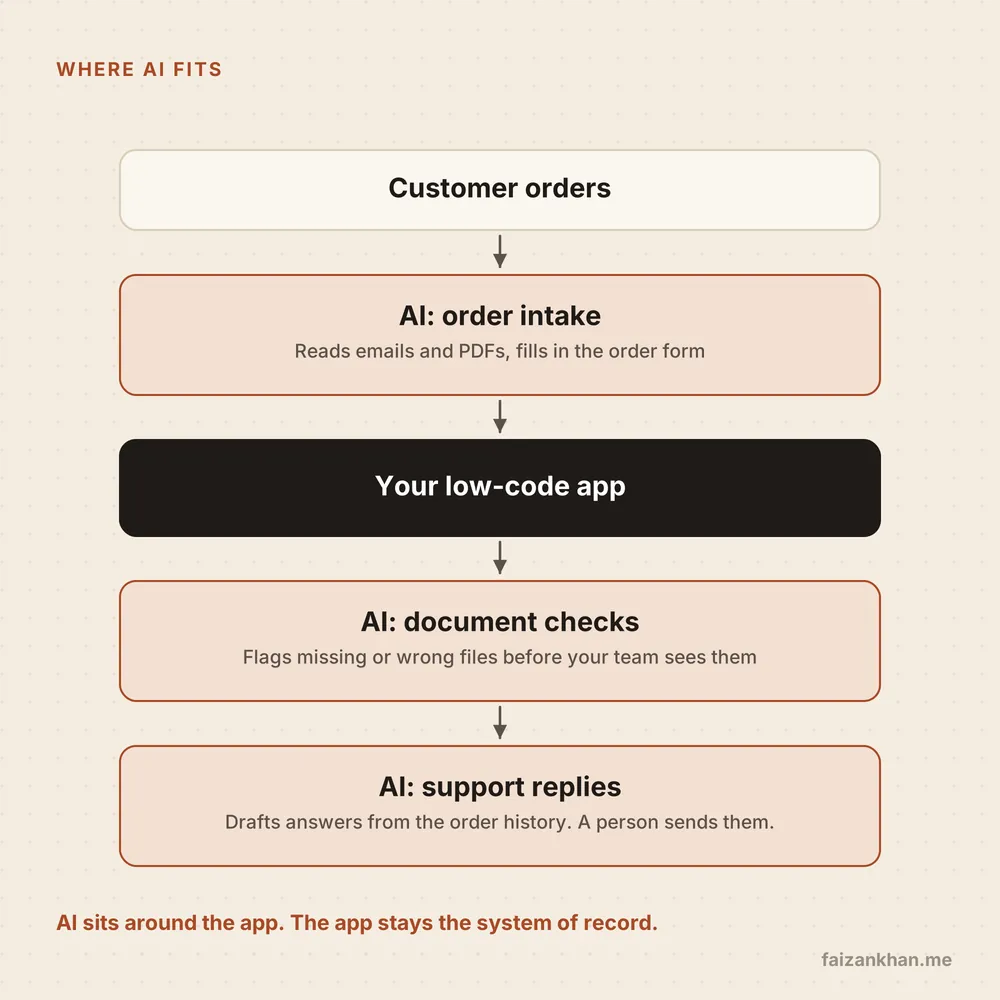
The important part: AI sits around the app, not inside it. Your low-code app stays the system of record, the one place where the true order, customer and status live. The AI services talk to it through its API, like any other integration.
You do not touch the fragile core. Each AI piece can be tested, measured and switched off on its own, and gets only the access it needs (least privilege).
In my agent work I build these as small, typed tools, so a bad extraction fails validation before a person sees it.
AI around the app, a person in the loop, and the app as the source of truth.
How to decide
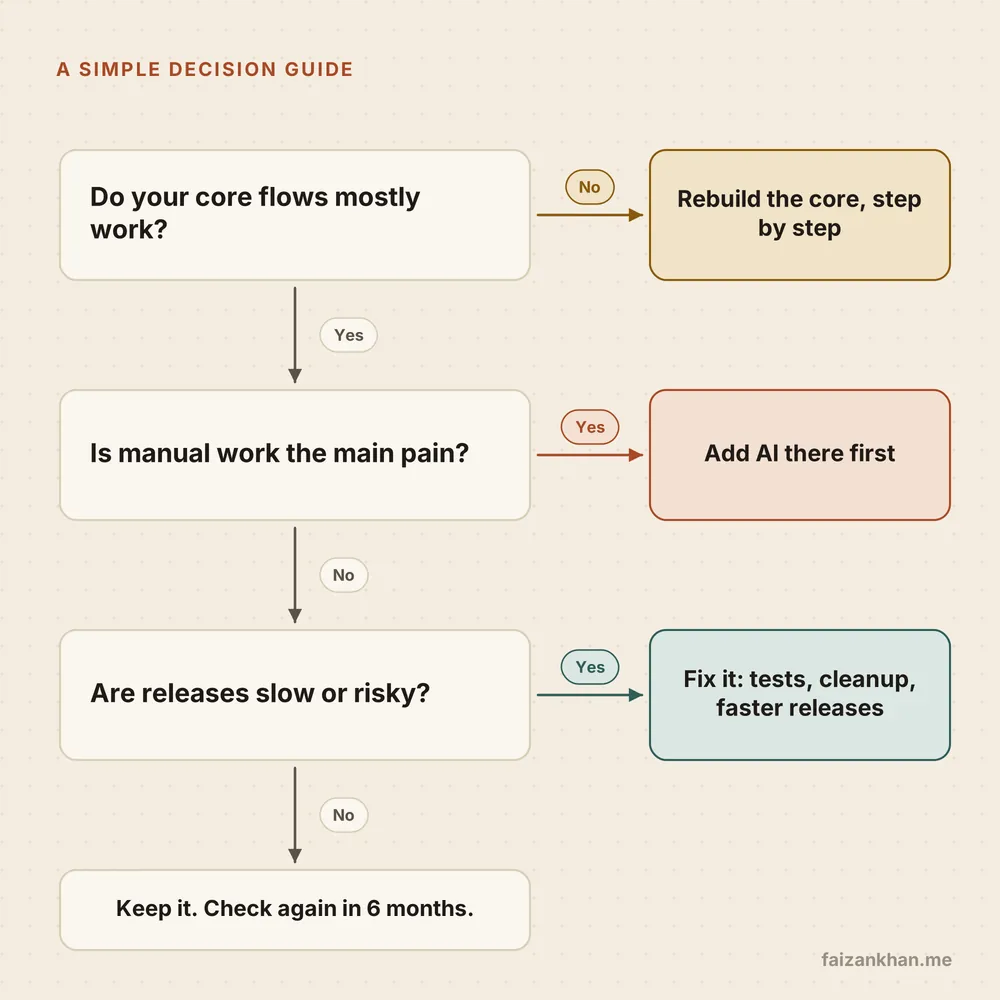
I use three simple questions:
- Do the core flows mostly work? If not, rebuild the core step by step, behind the same front door.
- Is manual work the main pain? If yes, add AI first. It gives a visible win quickly and buys you time.
- Are releases slow or risky? If yes, fix: tests, cleanup and a faster release process.
If all three answers are "we are fine", keep the app and check again in six months. Many low-code apps do exactly their job.
Start with a short audit
You cannot answer those questions from a meeting room. Someone has to look inside.
So the first step is almost always a short, paid audit with a fixed scope: the app, the release process, data volumes, integrations, licence and agency costs, and where people work around the system. You get a written picture and a ranked list of options.
Paid and independent matters. A free review from someone selling rebuilds usually recommends a rebuild.
I have moved legacy data pipelines to new platforms more than once. Doing it in steps, with the old system still running, is the part I would never skip. Apps are no different.
What I would tell you
- Look at the Excel file. Where people work around the app shows you where it hurts.
- Fix before you rebuild. Tests, cleanup and a release pipeline often solve more than you expect.
- Rebuild in slices. Replace one flow at a time behind the same front door.
- Put AI around the app, not inside it. Keep a person reviewing, and keep the app as the system of record.
- Own the knowledge. Whatever you choose, make sure your own team can understand the app without the agency.
- Start with a short paid audit. From someone who is not selling you the rebuild.
Working on something like this?
Tell me what you are building and where you are stuck. I will tell you honestly if and how I can help. Or email hello@faizankhan.me.

Muhammad Faizan Khan is an AI and data engineer in Berlin. He builds AI agents, data platforms and the software around them. More about me.